White-label reports and share links
Put your logo and colours on the reports you share, create read-only links to a project's rankings or a site audit, and export them as PDF.
Share a project's rankings or a site audit with a client through a read-only link, branded with your logo and colours. White-label is included on every plan, and sharing is free.
Brand your reports
Owners and admins set the branding once for the whole workspace: Settings → Workspace → Report branding.
| Field | |
|---|---|
| Brand name | Shown when there's no logo, and as the logo's alt text. |
| Logo | PNG, JPEG or WebP, up to 512 KB and 4000 px; shown up to 48 px tall. SVG isn't supported. |
| Primary colour | Brand name, rules, key figures and top-3 badges. A warning appears if it's hard to read on white. |
| Secondary colour | Optional: a band behind the report header. Its text turns white or dark for contrast. |
| Hide "Verified by PeekRank" | Removes PeekRank's line from the footer. |
The Live preview shows a rank report and a site audit with sample data as you type. Nothing changes for your clients until you click Save branding.
Share a project's rankings
Open the project and click Share report.
Choose when the link expires (Link expires): Never, 7 days, 30 days or 90 days.
Click Create link, then Copy.
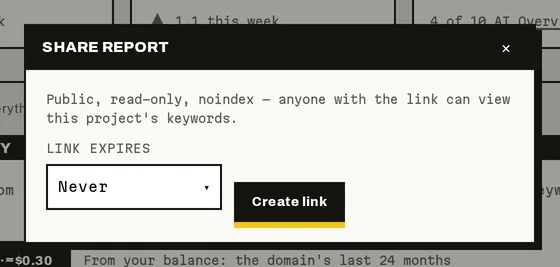
Sharing a project's rankings (sample data).
Your client sees, with your branding:
- The project's name and domain.
- Keywords: every tracked keyword with its current Rank, as of the moment they open the link (it's live, not a snapshot). They can search it.
- Visibility in AI answers, when the project has Prompt Tracking or AI Overview data: how often AI answers name you, your share of voice, and how many Google AI Overviews cite you.
The page is read-only and not indexed by search engines. The link lives on app.peekrank.io.
Share a site audit
On a finished site audit, click Share audit (same expiry options) or Export PDF. The shared audit shows the health score, pages crawled and issues, with your branding and a Download PDF button. Export PDF opens it ready to print or save as PDF.
Manage links
- Each project, and each audit, has one active link at a time.
- Anyone who can see the project can create its link. Owners and admins can also click New link (the old one stops working at once) or Revoke link.
- An expired, revoked or replaced link shows "This link isn't available".
- Archiving a project turns off its links.
Do it from your AI assistant
share_link: Public share link. Set-up, nothing billed in the call.set_report_branding: Report branding. Set-up, nothing billed in the call.
These are workspace-management tools: only owners and admins who allowed it when connecting see them. Try: "Create a 30-day share link for my acme.com project."
Last updated on