Prompt Tracking
Ask ChatGPT, Gemini, Google AI Mode, Perplexity and Claude what your customers ask, and track whether they name your brand, where, and what they cite.
People ask AI assistants which tool to buy, which agency to hire, which product is best. Prompt Tracking asks those questions for you, every week or every day, to each AI engine you choose, and tracks whether the answer names your brand, in what position among the brands it names, and whether it cites your site.
Set it up
Prompt Tracking works per project. Open Prompt Tracking (under AI Visibility & AEO/GEO in the side menu), pick the project at the top, and fill in Set up Prompt Tracking:
| Field | What to put |
|---|---|
| Your brand | Your brand as people would write it in an answer. Defaults to the project's name. |
| Other names (aliases) | Product names, spellings, abbreviations (up to 10). Press Enter after each. |
| Your domains | Your sites (up to 5). Answers that cite them count as citing you. Defaults to the project's domain. |
| Competitors | Up to 10, as a name, a domain or both: Semrush (semrush.com). |
| Market | The country and language the questions are asked in (14 markets). |
| Engines | ChatGPT, Gemini, Google AI Mode, Perplexity (API) and Claude (API). All but Claude are on by default. |
| Asked automatically | Weekly or Daily, with the monthly price per prompt next to each. |
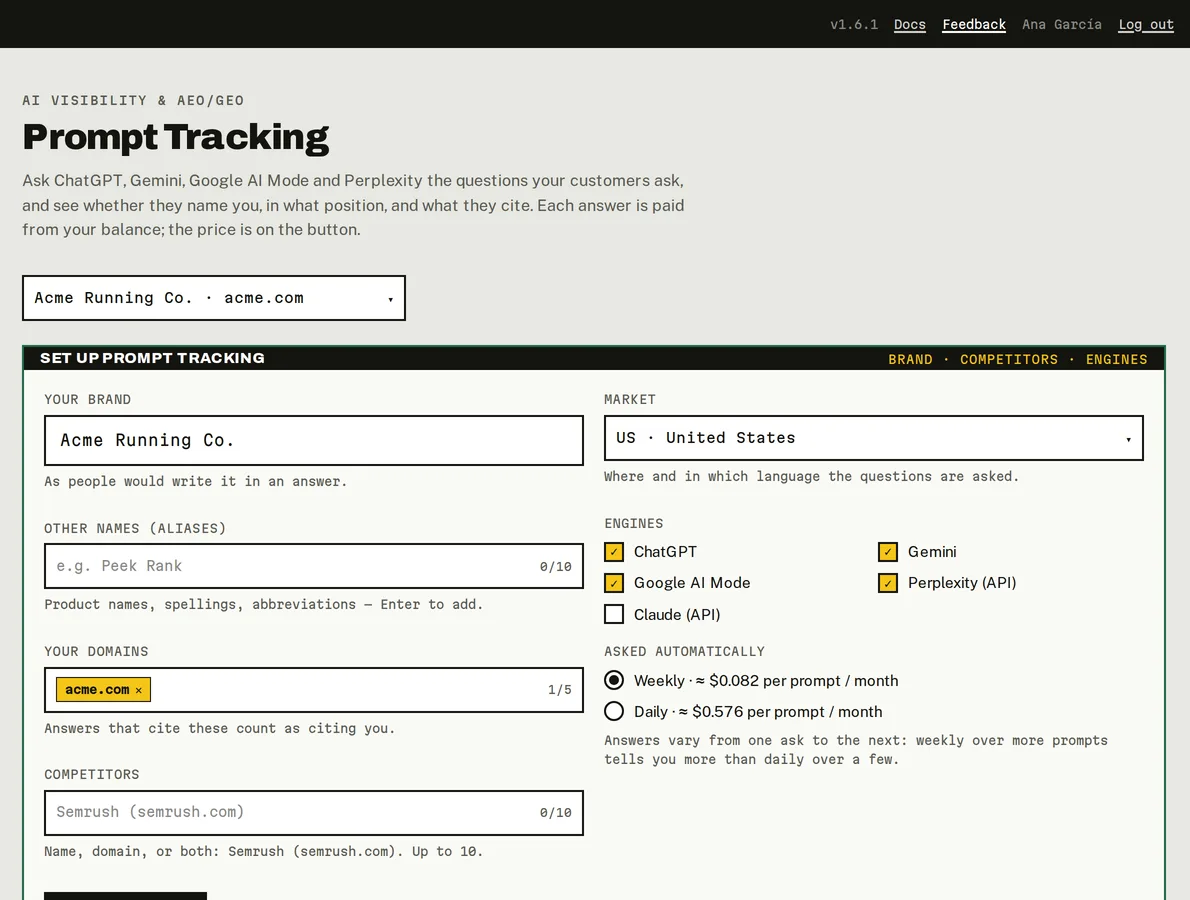
Setting up Prompt Tracking for a project (sample data).
Click Save and start. Saving is free; nothing is asked until you add prompts. You can change the setup any time (Edit setup): PeekRank re-reads the answers it already stored with your new brand names, for free.
Add prompts
Type a question your customers would ask, like Which rank tracker should an agency use?, in Prompt and click Track prompt. It's asked to every engine you chose straight away, then weekly or daily. The button shows the price, and the line under it says what it will cost per month.
Not sure what to ask? Suggested prompts come from your keywords' "People also ask" questions, "What is the best …" for your keywords, "What are the best alternatives to …" for your competitors, and what the engines themselves search for. Clicking a suggestion tracks it and asks it right away.
Prompts are 3 to 300 characters; a project tracks up to 200. To stop tracking one, click ×: it stops being asked, and its past answers stay in your history. A prompt's text can't be edited: stop it and add the new wording.
What it costs
| Per prompt, each time it's asked | |
|---|---|
| ChatGPT | $0.0024 |
| Gemini | $0.0024 |
| Google AI Mode | $0.0024 |
| Perplexity | $0.012 (at most $0.03) |
| Claude | $0.05 (at most $0.10) |
| The four default engines together | $0.019 |
One prompt asked to the four default engines costs about $0.082 a month weekly, or $0.576 daily. Answers vary from one ask to the next, so weekly over more prompts tells you more than daily over a few.
Read the results
Four figures sum it up, from each prompt's latest answer per engine:
- Answers that name you, with a margin of error (± points) that shrinks as you track more prompts.
- Cite your site: answers that link to one of your domains.
- Avg position: your average place among the brands an answer names.
- Data spent this month on Prompt Tracking, and the monthly estimate.
Prompt × engine has one row per prompt and one column per engine:
| Cell | Meaning |
|---|---|
| #1, #2, … | Your position among the brands the answer names (#1 and #2 highlighted). |
| — | The answer doesn't name you. |
| ● | The answer cites your site. |
| 2/4 | Named in 2 of the 4 answers of the last 4 weeks. |
| … | Being asked right now. |
| ∅ | No answer came back. It doesn't count in any rate. |
| · | Not asked yet. |
Click a cell to read the answer: the brands it names in order, the text with your brand highlighted, the sources it cites and what it searched the web for.
How answers arrive
- ChatGPT, Gemini and Google AI Mode are asked the way a person uses them: answers arrive within minutes.
- Perplexity and Claude answer through their API with web search.
While answers are on their way, cells show … and the page checks for them by itself. If you close it, they're collected on the next hourly run. Check now on a row (or Check all) asks again before the next scheduled time; it's billed like any ask.
How your brand is detected
- Your brand matches by name, aliases and domains, as whole words, ignoring case and accents.
- Position is the order in which brands are first mentioned in the answer, counting every brand it names, tracked or not.
- Brands you don't track are found from the answer's own brand list, its links, its numbered headings and the names seen in your other answers. They appear in Share of Voice.
- Cites you means a source on one of your domains (or a subdomain). Being cited and being named are measured separately.
Do it from your AI assistant
set_up_prompt_tracking: Set up Prompt Tracking. Set-up, nothing billed in the call.get_ai_visibility: AI visibility (Prompt Tracking). Free.get_ai_answer: Read one AI answer. Free.check_ai_prompts: Ask the AI engines again (billed). Billed: ≈ $0.019 per prompt (4 engines) (at most $0.037).archive_prompts: Stop tracking prompts. Set-up, nothing billed in the call.
Try: "How often does ChatGPT name us when people ask for the best rank tracker?" or "Track these three prompts in my acme.com project and ask them now: …"
Last updated on
Site Audit
Crawl up to 100 pages of your site for technical SEO issues, read the health score and the issues by severity, and share the audit as a branded link or PDF.
Share of Voice
How much of the AI conversation is yours rather than your competitors', engine by engine, worked out for free from your Prompt Tracking answers.