Track keywords
Add, import, check and remove the keywords a PeekRank project tracks, read their positions, and keep their search volume and difficulty up to date.
A tracked keyword is a search you follow on Google for one project, like running shoes for acme.com. PeekRank
checks where the project's domain appears for it every 7 days, keeps every result, and shows how it moves.
Add keywords
Open the project and click + Add keywords.
Type or paste your keywords, one per line or separated by commas. Duplicates and keywords you already track are skipped.
Choose whether to keep Also load their last 12 months of positions ticked (it is by default). Ticked, each new keyword gets its last year of monthly positions, so its charts don't start empty: $0.00312 per keyword, once. See Ranking history.
Click Add keywords. A long list is added in batches; keep the dialog open until it says how many were added.
Adding keywords is free. Each new keyword is checked right away ($0.0093 each) and then automatically every 7 days. The dialog shows the price for the keywords you typed before you add them.
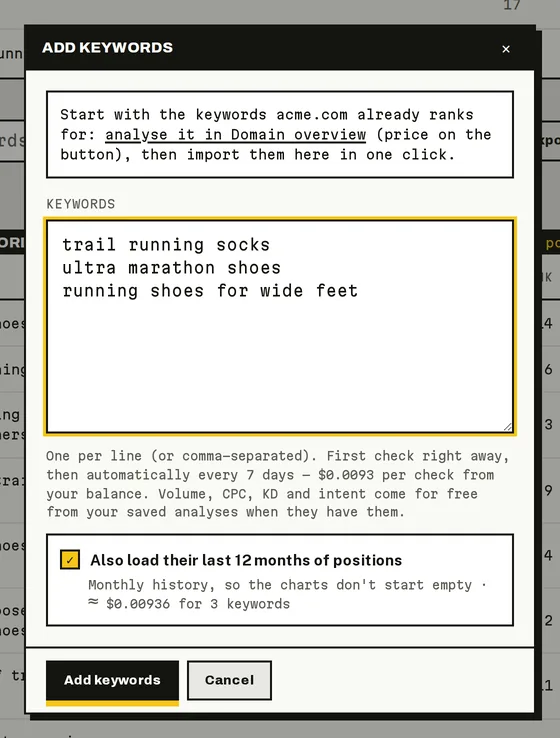
The Add keywords dialog (sample data).
Import the keywords you already rank for
If you've analysed the project's domain in Domain Overview, the Add keywords dialog offers Import N: the keywords that analysis found and you don't track yet. Importing is free, and their search volume, CPC, difficulty and intent come along. If there's no analysis yet, the dialog suggests running one.
Add keywords from other tools
Tick keywords in Keyword Research, Domain Overview or Competitor Gap and click Add to project. Pick the project (the one with the same domain is preselected, and you can create one right there) and click Add. The dialog shows the price of the first check and the monthly cost of tracking them.
Read the keywords table
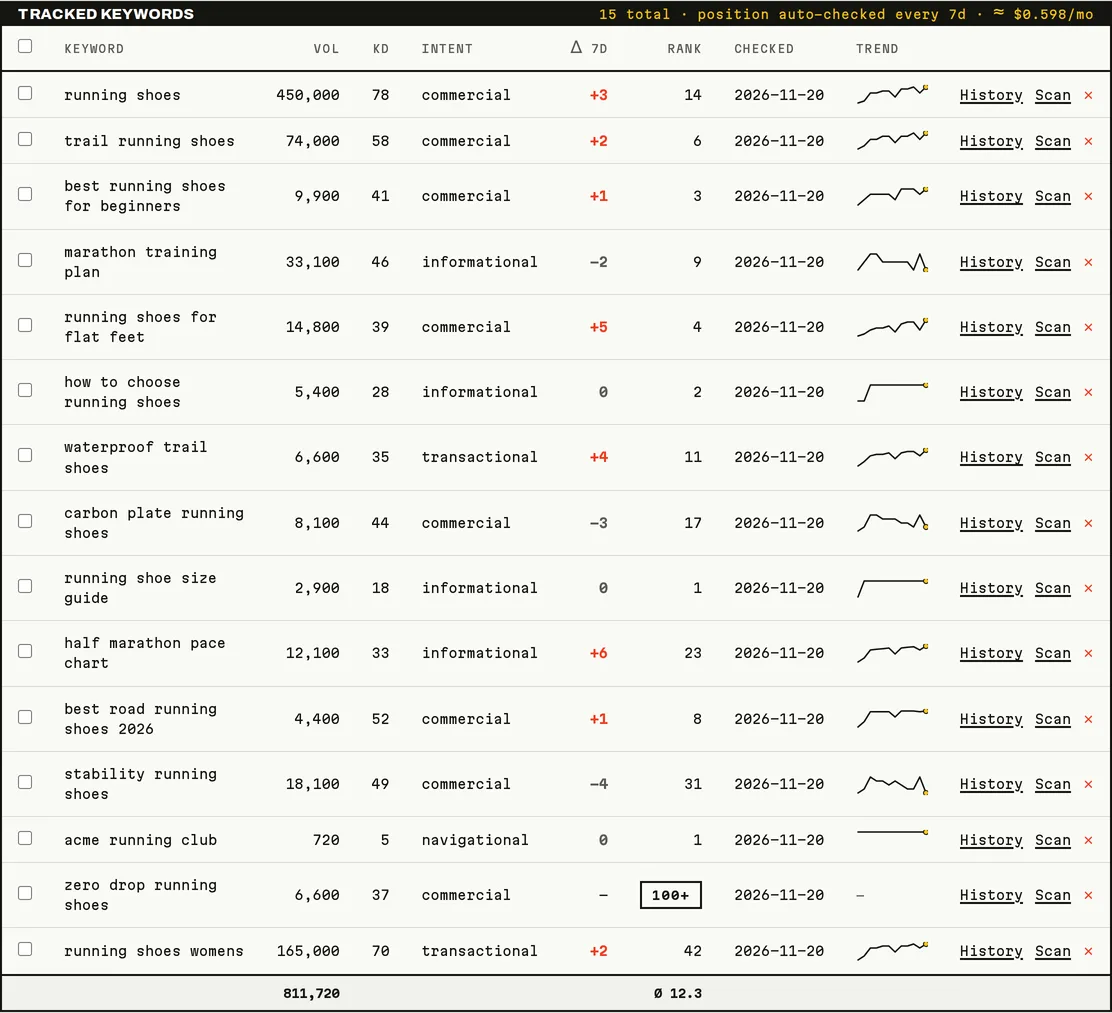
Tracked keywords (sample data).
| Column | What it shows |
|---|---|
| Keyword | The search. Click it to open it in Keyword Research. |
| Vol | Monthly searches in Google. |
| KD | Keyword difficulty, 0 to 100: how hard it is to reach the top 10. |
| Intent | Why people search it: informational, navigational, commercial or transactional. |
| Δ 7d | Places moved since about a week ago. Positive means it moved up. |
| Rank | The latest Google position (1 is the top). |
| Checked | When the latest check ran. |
| Trend | Its recent positions. Click it for the full history. |
CPC, Location and Device are hidden; turn them on in Columns. Filter by device or intent, search, and use Export CSV or Copy (it pastes straight into a spreadsheet).
The Rank cell can also say:
| Meaning | |
|---|---|
| Queued | Not checked yet. The first check runs automatically within about 2 hours. |
| Checking… | A check is running. Results usually arrive within a few minutes, and the page updates by itself while it's open. |
| 100+ | Checked, and the domain isn't in the first 100 results. |
Clicking a keyword opens Keyword Research for it: your saved research if you have one, otherwise it runs a new one at the price shown in the tooltip.
Check positions now
Automatic checks run every 7 days. To see a position sooner:
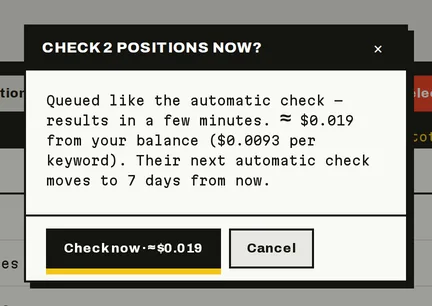
Check now asks before it bills, with the total for the keywords you ticked (sample data).
- Check now: tick one or more keywords and click Check now. It costs the same as an automatic check, $0.0093 per keyword, and shows the total before you confirm. Results arrive within a few minutes, and those keywords' next automatic check moves to 7 days from now. Keywords already being checked are skipped and not billed.
- Scan: on a keyword's row, Scan checks its position live and shows it straight away, for $0.031. It's billed when you click, without a confirmation (point at it to see the price).
Both need the project to have a domain and the workspace to have balance left.
How checks work
- Every keyword is checked on Google, United States, English, desktop, in the first 100 results.
- There's no fixed weekday: a keyword is due 7 days after its last check, and PeekRank checks what's due every hour.
- Each check also records whether Google showed an AI Overview and who it cited, at no extra cost.
- When the balance runs out, checks pause and the keywords wait. Nothing is lost; they run again when there's data.
A project with 100 keywords costs about $3.99 a month in checks. The header of the keywords table shows the estimate for yours.
Search volume, difficulty and intent
Vol, CPC, KD and Intent come for free from your saved analyses (Keyword Research, Domain Overview, Competitor Gap): PeekRank copies the freshest values whenever you add keywords or open the project. Point at a value to see where it came from.
For keywords no analysis covers, a banner offers Look up metrics: it fetches them for $0.024 for one keyword, or $0.048 for 100, after you confirm. A keyword with no data shows — ("No data") and isn't offered again for 30 days.
Remove keywords
Click ✕ on a row, or tick several and click Delete selected. Their rank history is deleted with them and can't be recovered. Removing is free.
Good to know
- You can track as many keywords as you like; each one is up to 200 characters.
- Every keyword in a project is checked every 7 days; the frequency can't be changed yet.
- Rank tracking covers Google in the United States, in English. Keyword Research and Prompt Tracking work in 14 markets.
Do it from your AI assistant
add_keywords: Track keywords. Set-up, nothing billed in the call.check_rankings: Check tracked keywords now (billed). Billed: $0.0093 per keyword.scan_keyword: Check a keyword's position now (billed). Billed: $0.031 per keyword.fetch_keyword_metrics: Look up tracked keywords' metrics (billed). Billed: $0.048 per 100 keywords.remove_keywords: Stop tracking keywords. Set-up, nothing billed in the call.get_project: Get project rankings. Free.
Try:
- "Track these keywords in my acme.com project: …"
- "Check the positions of my top 20 keywords now."
- "Which of my keywords dropped out of the top 10 this week?"
Last updated on