Top up your balance
Add money to your PeekRank balance by card with Stripe, get an invoice, and see what a top-up unlocks: unlimited projects and a balance that never expires.
A top-up adds dollars to your workspace's balance, used after each month's free data. It never expires. Your first top-up also unlocks unlimited projects.
Top up
Only owners and admins can top up.
In the side menu, click Data & billing, then Top up.
Pick an amount ($5, $10, $25 or $50), or type another amount from $5 to $500 in Or another amount (USD).
Click Continue to payment and pay on Stripe's secure page.
You come back to Data & billing: "Payment received — your balance updates in a few seconds." Your receipt and invoice arrive by email.
If you cancel on the payment page, nothing is charged.
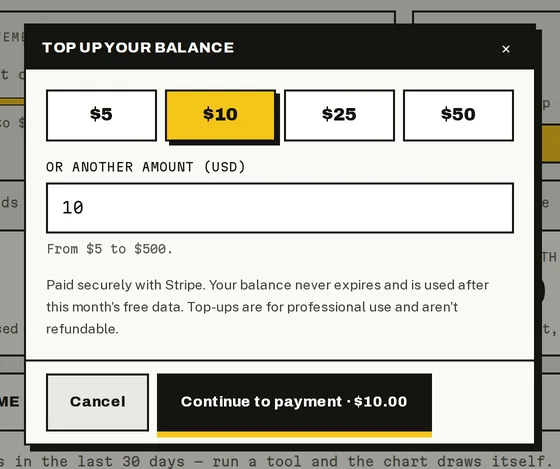
Choosing a top-up amount.
Good to know
- In dollars, not credits. $10 topped up is $10 of balance, spent at the prices on the buttons.
- Never expires. Unspent balance stays until you use it.
- Not refundable. Top-ups are for professional use and aren't refundable.
- Invoice. Every top-up comes with a Stripe invoice by email.
- Unlimited projects. Your first top-up lifts the free plan's 1-project limit. If a top-up is later refunded, the limit comes back (your existing projects stay).
- AppSumo bonus. With an AppSumo lifetime deal, every top-up gets extra data on top: +15%, +30% or +50% depending on your tier.
How much to top up
Start small: most actions cost cents. As a guide, 100 keywords checked every week cost about $3.99 a month, and a keyword research run at most $0.10. Prices and limits has every price and some example months.
Do it from your AI assistant
create_top_up_link: Top-up payment link. Set-up, nothing billed in the call.get_budget: Budget and limits. Free.
Assistants never pay: create_top_up_link gives you Stripe's payment page, and you pay there yourself.
Last updated on
Free data and your balance
How PeekRank's free monthly data and prepaid balance work, what's free and what's billed, what happens when you run out, and the daily safety limit.
See what you spent
The Data & billing page explained, spend over time, the usage ledger, the most expensive calls and spend by project, member and channel.