Ranking history
Load up to 12 months of past positions for each keyword and 24 months for your domain, read a keyword's history, and what it costs.
Most rank trackers start empty on the day you sign up. PeekRank can load the past: the last 12 months of each keyword's monthly positions and the last 24 months of your domain's rankings and traffic. You pay for it once; looking at it again is free.
What you can load
| History | How far back | Price |
|---|---|---|
| A keyword's monthly position | The last 12 months | $0.00312 per keyword ($0.312 for 100) |
| Your domain: keywords in the top 3, 10 and 50, and estimated organic traffic, month by month | 24 months (3, 6, 12 or 24 in the app) | $0.30 for 24 months |
Keywords go back 12 months at most because that's how long the search results archive keeps each keyword's monthly snapshot; a domain's monthly totals go back further. Months with no data aren't billed, so the real charge can only be lower than the estimate.
Load past rankings
There are three ways in, and they all open the same Load past rankings dialog:
- On the project page, in Domain history, click Load 24 months.
- In Tracked keywords, tick keywords and click Backfill history.
- In a keyword's History, click Load its last 12 months.
Then:
Pick How far back: 3, 6, 12 or 24 months. Keywords stop at 12; the domain goes as far as you pick.
Choose which keywords: Only keywords without history (the default) or All keywords — re-fetch.
Check the total and click Load history. Keep the dialog open while it runs; long lists are loaded in batches.
When it's done it says what was loaded and billed. Click See the history.
You can also load a keyword's year of history when you add it: keep Also load their last 12 months of positions ticked in the Add keywords dialog. See Track keywords.
Read a keyword's history
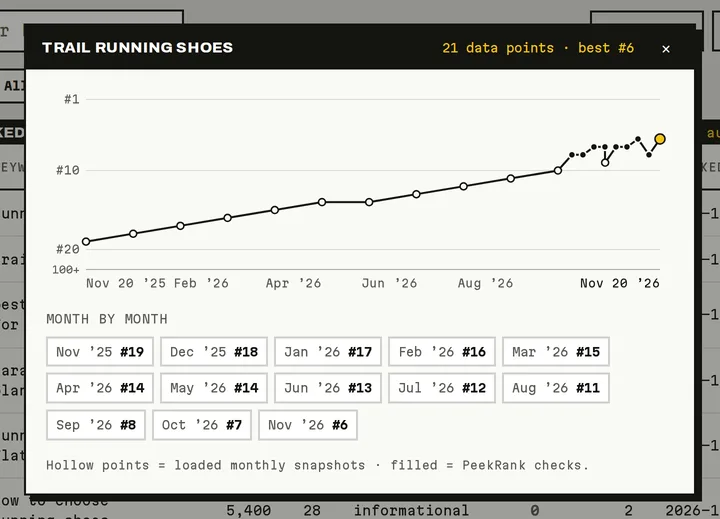
A keyword's history: loaded months and PeekRank's weekly checks (sample data).
Click History on a keyword's row, or click its Trend. You see:
- A chart of its positions over time. Hollow points are loaded monthly snapshots; filled points are PeekRank's own checks.
- Month by month: its position each month, or 100+ when the domain wasn't in the first 100 results.
- Where each point came from when you point at it: backfill (monthly), weekly check or manual scan.
Opening a keyword's history is free.
Read the domain's history
On the project page, Domain history shows two charts once loaded:
- Keywords by position: how many keywords the domain had in the top 3, top 10 and top 50, each month.
- Est. organic traffic / mo: the monthly visits Google search likely sent it.
Use Refresh to load it again later (billed again). The same history appears for free in Domain Overview when you analyse that domain, and vice versa.
Do it from your AI assistant
get_keyword_history: Keyword rank history. Free.backfill_keyword_history: Load tracked keywords' past positions (billed). Billed: $0.00312 per keyword (12 months).load_domain_history: Load a domain's monthly history (billed). Billed: $0.30 per 24 months.diagnose_keyword: Why did this keyword move?. Free.
Try: "Load the last 12 months of history for the keywords in my acme.com project that don't have it yet." or "Why did 'running shoes' drop last month?"
Last updated on
Track keywords
Add, import, check and remove the keywords a PeekRank project tracks, read their positions, and keep their search volume and difficulty up to date.
Read the project page
Every block of a PeekRank project page explained, from the overview figures and movers to the weekly domain and backlinks snapshot.